| Inkscape » Files » Printing Files |    |
|---|
Updated for v0.46
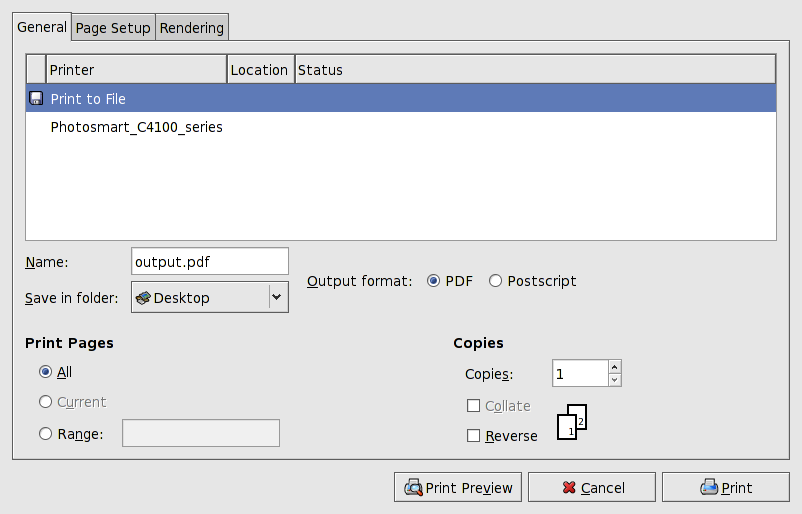
Printing your drawing can be done through the
→
 Print...
(Ctrl-P) dialog. As of v0.46, the standard GTK print
dialog is used. This allows printing to any PostScript-capable
printer as well as to either a PostScript or PDF file. Printing
uses the
Cairo-based
routines (although not the one used to compile the Inkscape
program!). The PostScript back-end makes heavy use of rasterizing
the image. See the PostScript and PDF entries in the previous
(Export) section for more details.
Print...
(Ctrl-P) dialog. As of v0.46, the standard GTK print
dialog is used. This allows printing to any PostScript-capable
printer as well as to either a PostScript or PDF file. Printing
uses the
Cairo-based
routines (although not the one used to compile the Inkscape
program!). The PostScript back-end makes heavy use of rasterizing
the image. See the PostScript and PDF entries in the previous
(Export) section for more details.
There are two options for rendering output found under the Rendering tab. The first Vector uses vector operators. the drawing is scalable but some properties are lost.
The second option is Bitmap which rasterizes the output. There is an option to set the DPI for the output but this does not appear to have any effect. All drawing elements are rendered correctly but with poor resolution.
![[Note]](../images/admons/note.png) | Note |
|---|---|
An Inkscape PostScript file can be converted to an Encapsulated PostScript file (EPS) by removing the last line in the file (delete “showpage”). A “BoundingBox” line is already included in the PS file. |
| |  | |
| Exporting Files |  | Vacuuming Files |
© 2005-2008 Tavmjong Bah. | Get the book. |